Workflow Stories #2: The Fan Account That Posts Every Day on Four Platforms (Population: One Human)
 Arun Philips
Workflow Stories is our series of first-person walkthroughs of real workflows, shown through the dreams of our first users. Story one was about announcing a dream to 2,000 people without a single spam blast. Story two is about what happens after the announcement: showing up every single day. ✨
Artizen Fam is exactly what it sounds like: an independent, fan-driven hub that surfaces and celebrates the best projects in the Artizen ecosystem. The problem it exists to solve is one we care about deeply: brilliant projects struggle with consistent marketing and storytelling, so great work doesn't get the visibility (or funding) it deserves.
The catch: a page like that only works if it shows up every day, everywhere its audience is. That's a media company's workload. Artizen Fam runs it as a dream on DreamStarter, and the numbers tell the story: 79 posts published across Instagram, LinkedIn, X and YouTube, including a daily carousel series and auto-clipped interviews, all flowing from one dream. Here's the machine. ⚙️
💚 Step 1: One dream, four channels
The dream's brief defines the mission: community-run, creator-focused, the go-to place for discovering exciting Artizen projects. Then the accounts got connected in Settings → Social accounts: @artizenfam on Instagram and X, the Artizen Fam YouTube channel, and LinkedIn. From that moment, every agent that produces content can also ship it, natively formatted per platform, through DreamStarter's publishing engine.
That's the foundational trick of the whole operation: content is written once, at the idea level, and the platform versions are generated, scheduled and published by the agents. Publishing runs at 15 to 22 posts per platform so no channel is the neglected one.
🎠 Step 2: The daily highlight carousel
The heart of Artizen Fam is the highlight series: one carousel a day, each one celebrating a single Artizen project. Recent features include Traditional Dream Factory, Unplug to Upskill, Circular Spa, Reset and Rise, Tune In Show and Form Free Radio.
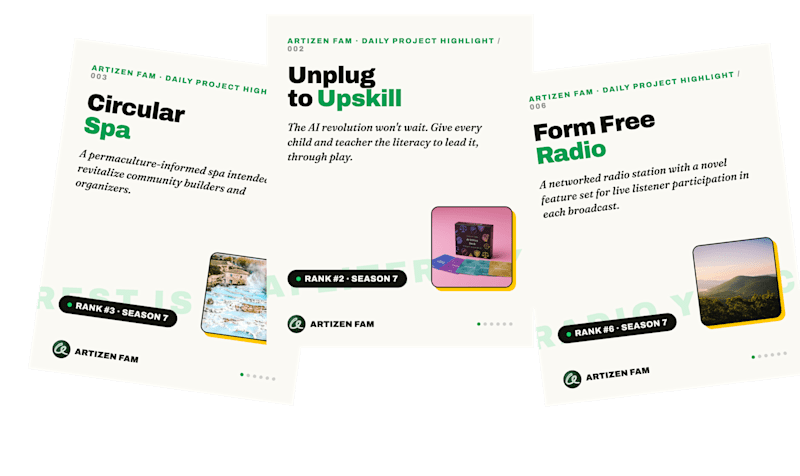
Three real daily highlight covers: Circular Spa, Unplug to Upskill, Form Free Radio
Three real covers from the daily highlight series. Each day celebrates one project, in the community's own visual language rather than ours.
Each day's highlight is produced in two cuts from the same source: a 6-slide version for Instagram and LinkedIn, and a 4-slide X cut (X shows at most four images per post, so the design leads with the strongest slides rather than letting the platform truncate). Captions are written per platform: longer thesis framing for LinkedIn, tight and taggy for X, hashtag-aware for Instagram.
🛠️ How the production week works
The rhythm is weekly batches, not daily scrambles. Agents research the featured projects and assemble the slides; a human reviews every rendered card and caption; then the whole week gets scheduled in one sitting. Thirteen carousels went out in the first six days of the series this way.
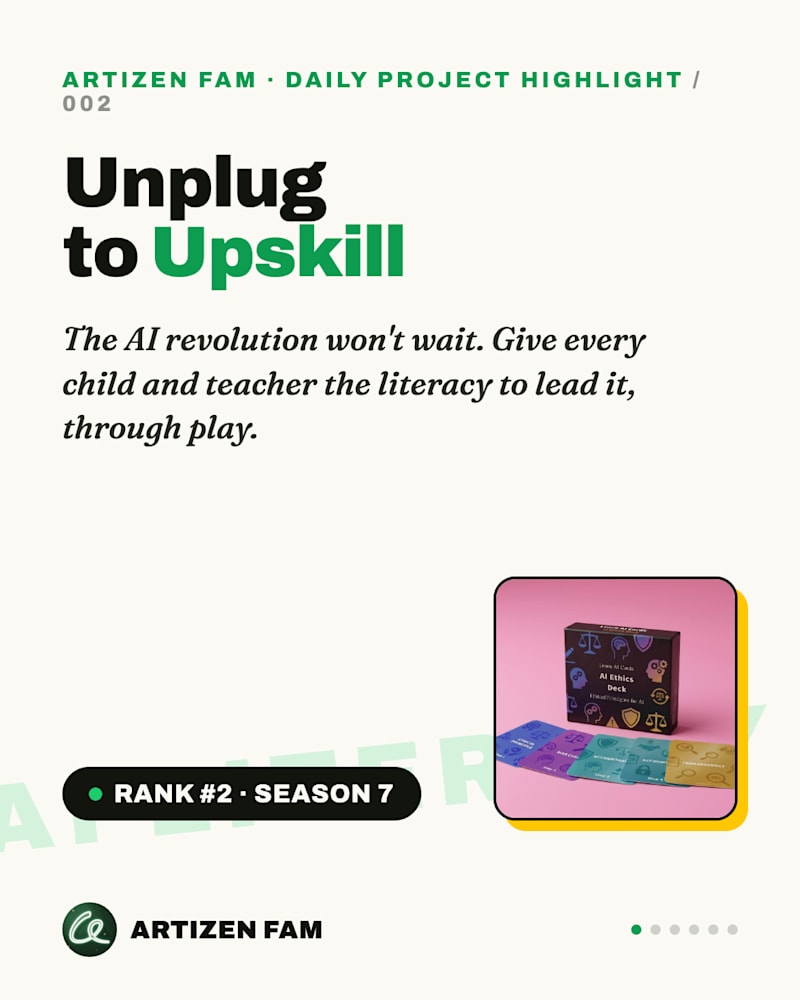
Daily project highlight cover for Unplug to Upskill, rank 2 Season 7
A finished daily card: project name, why it matters, the artifact, and its live Season 7 rank on Artizen.
The review gate matters. A fan account's only currency is that the featured creators feel seen, so nothing posts without a human approving it. Consistency comes from the agents; credibility comes from the person behind the page.
🎬 Step 3: Interviews that clip themselves
Artizen Fam also runs conversations with creators, like the recent interview with Akasha, creator of the regenerative sci-fi screenplay Artisans of Time, about flipping apocalyptic sci-fi's script. One conversation like that is a week of content if somebody does the cutting. Nobody wants to do the cutting. So the cutting is automated, end to end. Here's exactly how it executes.
📡 The weekly showcase, clipped automatically
DreamStarter's Video Clipper is pointed at the @artizenfund YouTube channel on a weekly schedule. Every week it checks the channel for new uploads, including the weekly creator showcases, pulls each new video, and extracts the strongest moments as short clips: two per video, each with an AI-written headline and word-level karaoke captions burned in. No one watches the timeline looking for the good part; the agent finds the highlight, cuts it, and pushes it into the posting pipeline.
To set it up on any dream: in the video tools, point Video Clipper at a YouTube channel (yours, or the one your community orbits), choose clips per video and the cadence, and turn on captions. From then on it runs on schedule. One honest note from our own dogfooding: check the pipeline status after the first run; a failed run pauses visibly rather than silently, and a retry is one click.
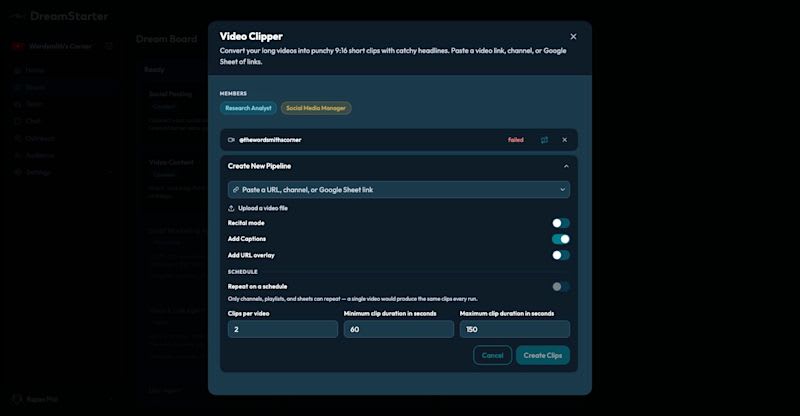
The Video Clipper pipeline setup: source, captions toggle, schedule, clips per video and durations
The whole setup, one dialog: paste a video link, a channel, or a Google Sheet of links (or upload a file), toggle captions, set clips per video and durations, and switch on the weekly schedule. The red “failed” pipeline above it is our own honest history: it paused visibly, and retry is the little loop icon.
🎯 Two-person interviews, cropped around whoever is speaking
Interview footage has a specific problem: the source is a wide two-person frame, and a vertical clip that just center-crops it shows two half-faces and helps nobody. The clipper handles this intelligently: it detects who is speaking at each moment and keeps the crop on the active speaker, reframing as the conversation moves back and forth. The result is a vertical clip that always holds the right face, perfectly framed for the design, like a human editor cut it shot by shot. That's what makes a two-person format like the Artizen Fam conversations clip-able at all.
🏷️ Captions that recognize people
The last piece is distribution, and it's the most quietly powerful one. When a clip or a highlight goes out, the agents recognize the creators and founders involved and tag them automatically in the captions: the person speaking in the clip, the founder whose project is being featured. Discovery finds who they are, matches them against the dream's CRM, and the per-platform captions go out with the right handles attached.
Tagging is the whole distribution engine for a fan account. A well-made card or clip about someone's work, posted with their handle on it, is the single most reshareable asset on the internet: the featured creator sees it, shares it, and brings their audience with them. Doing that by hand means looking up four different handles on four platforms for every post, every day. The agents just do it. ✨
📇 Step 4: The relationship layer
Behind the content sits a dream-scoped CRM with 92 leads: creators to feature, collaborators, community members. Every highlight is also an outreach touchpoint, because a well-made card about someone's project is the single most reshareable asset on the internet. The feature-then-connect loop is what turns a content calendar into a community.
💡 Steal this workflow
For anyone running a community page, a fan account, or a curation brand:
🔌 Connect every platform once; write at the idea level and let agents handle per-platform versions.
🎠 Pick one repeatable daily format (a highlight carousel) and produce it in weekly, human-reviewed batches.
🎬 Point Video Clipper at the channel you cover so every long video becomes clips automatically.
📇 Treat every feature as a relationship: the people you celebrate belong in your CRM, not just your feed.
❤️ Keep a human on the approve button; consistency comes from the agents, credibility comes from you.
Artizen Fam proves the shape: one person's love for a community, multiplied by a team of agents, shows up like a media company. Your first dream is free at DreamStarter.xyz ✨
Previously in Workflow Stories: how Rajan told 2,000 people about his dream without a single spam blast. Next up: the follow-up machine, or how an EdTech founder taught 321 emails to send themselves. ✉️